
Search
Local Search
Section titled “Local Search”VitePress supports fuzzy full-text search using an in-browser index thanks to minisearch. To enable this feature, simply set the themeConfig.search.provider option to 'local' in your .vitepress/config.ts file:
import { defineConfig } from 'vitepress'

export default defineConfig({
  themeConfig: {
    search: {
      provider: 'local'
    }
  }
})
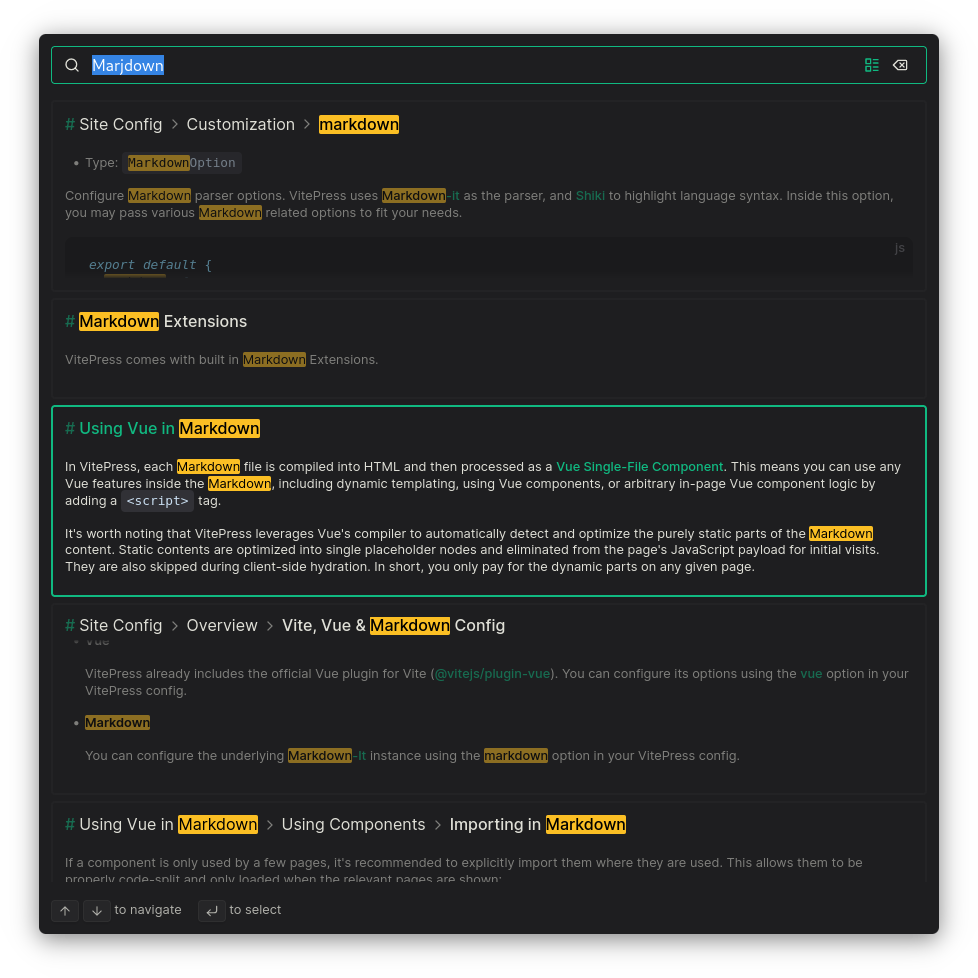
Example result:
Alternatively, you can use Algolia DocSearch or some community plugins like:
- https://npmx.dev/package/vitepress-plugin-pagefind
- https://npmx.dev/package/vitepress-plugin-typesense
- https://npmx.dev/package/vitepress-plugin-cloudflare-ai-search
You can use a config like this to use multilingual search:
import { defineConfig } from 'vitepress'

export default defineConfig({
  themeConfig: {
    search: {
      provider: 'local',
      options: {
        locales: {
          zh: { // make this `root` if you want to translate the default locale
            translations: {
              button: {
                buttonText: '搜索',
                buttonAriaLabel: '搜索'
              },
              modal: {
                displayDetails: '显示详细列表',
                resetButtonTitle: '重置搜索',
                backButtonTitle: '关闭搜索',
                noResultsText: '没有结果',
                footer: {
                  selectText: '选择',
                  selectKeyAriaLabel: '输入',
                  navigateText: '导航',
                  navigateUpKeyAriaLabel: '上箭头',
                  navigateDownKeyAriaLabel: '下箭头',
                  closeText: '关闭',
                  closeKeyAriaLabel: 'esc'
                }
              }
            }
          }
        }
      }
    }
  }
})
miniSearch options
Section titled “miniSearch options”You can configure MiniSearch like this:
import { defineConfig } from 'vitepress'

export default defineConfig({
  themeConfig: {
    search: {
      provider: 'local',
      options: {
        miniSearch: {
          /**
           * @type {Pick<import('minisearch').Options, 'extractField' | 'tokenize' | 'processTerm'>}
           */
          options: {
            /* ... */
          },
          /**
           * @type {import('minisearch').SearchOptions}
           * @default
           * { fuzzy: 0.2, prefix: true, boost: { title: 4, text: 2, titles: 1 } }
           */
          searchOptions: {
            /* ... */
          }
        }
      }
    }
  }
})
Learn more in MiniSearch docs.
Custom content renderer
Section titled “Custom content renderer”You can customize the function used to render the markdown content before indexing it:
import { defineConfig } from 'vitepress'

export default defineConfig({
  themeConfig: {
    search: {
      provider: 'local',
      options: {
        /**
         * @param {string} src
         * @param {import('vitepress').MarkdownEnv} env
         * @param {import('markdown-it-async')} md
         */
        async _render(src, env, md) {
          // return html string
        }
      }
    }
  }
})
This function will be stripped from client-side site data, so you can use Node.js APIs in it.
Example: Excluding pages from search
Section titled “Example: Excluding pages from search”You can exclude pages from search by adding search: false to the frontmatter of the page. Alternatively:
import { defineConfig } from 'vitepress'

export default defineConfig({
  themeConfig: {
    search: {
      provider: 'local',
      options: {
        async _render(src, env, md) {
          const html = await md.renderAsync(src, env)
          if (env.frontmatter?.search === false) return ''
          if (env.relativePath.startsWith('some/path')) return ''
          return html
        }
      }
    }
  }
})Example: Transforming content - adding anchors
Section titled “Example: Transforming content - adding anchors”import { defineConfig } from 'vitepress'
export default defineConfig({
themeConfig: {
search: {
provider: 'local',
options: {
async _render(src, env, md) {
const html = await md.renderAsync(src, env)
if (env.frontmatter?.title)
return (await md.renderAsync(`# ${env.frontmatter.title}`)) + html
return html
}
}
}
}
})Algolia Search
Section titled “Algolia Search”VitePress supports searching your docs site using Algolia DocSearch. Refer to their getting started guide. In your .vitepress/config.ts you'll need to provide at least the following to make it work:
import { defineConfig } from 'vitepress'

export default defineConfig({
  themeConfig: {
    search: {
      provider: 'algolia',
      options: {
        appId: '...',
        apiKey: '...',
        indexName: '...'
      }
    }
  }
})You can use a config like this to use multilingual search:
View full example
import { defineConfig } from 'vitepress'

export default defineConfig({
  themeConfig: {
    search: {
      provider: 'algolia',
      options: {
        appId: '...',
        apiKey: '...',
        indexName: '...',
        locales: {
          zh: {
            translations: {
              button: {
                buttonText: '搜索',
                buttonAriaLabel: '搜索'
              },
              modal: {
                searchBox: {
                  clearButtonTitle: '清除',
                  clearButtonAriaLabel: '清除查询',
                  closeButtonText: '关闭',
                  closeButtonAriaLabel: '关闭',
                  placeholderText: '搜索文档或向 AI 提问',
                  placeholderTextAskAi: '再问一个问题...',
                  placeholderTextAskAiStreaming: '正在回答...',
                  searchInputLabel: '搜索',
                  backToKeywordSearchButtonText: '返回关键词搜索',
                  backToKeywordSearchButtonAriaLabel: '返回关键词搜索',
                  newConversationPlaceholder: '提问',
                  conversationHistoryTitle: '我的对话历史',
                  startNewConversationText: '开始新的对话',
                  viewConversationHistoryText: '对话历史',
                  threadDepthErrorPlaceholder: '对话已达上限'
                },
                newConversation: {
                  newConversationTitle: '我今天能帮你什么?',
                  newConversationDescription:
                    '我会搜索你的文档,快速帮你找到设置指南、功能细节和故障排除提示。'
                },
                footer: {
                  selectText: '选择',
                  submitQuestionText: '提交问题',
                  selectKeyAriaLabel: '回车键',
                  navigateText: '导航',
                  navigateUpKeyAriaLabel: '向上箭头',
                  navigateDownKeyAriaLabel: '向下箭头',
                  closeText: '关闭',
                  backToSearchText: '返回搜索',
                  closeKeyAriaLabel: 'Esc 键',
                  poweredByText: '由…提供支持'
                },
                errorScreen: {
                  titleText: '无法获取结果',
                  helpText: '你可能需要检查网络连接。'
                },
                startScreen: {
                  recentSearchesTitle: '最近',
                  noRecentSearchesText: '暂无最近搜索',
                  saveRecentSearchButtonTitle: '保存此搜索',
                  removeRecentSearchButtonTitle: '从历史记录中移除此搜索',
                  favoriteSearchesTitle: '收藏',
                  removeFavoriteSearchButtonTitle: '从收藏中移除此搜索',
                  recentConversationsTitle: '最近对话',
                  removeRecentConversationButtonTitle: '从历史记录中移除此对话'
                },
                noResultsScreen: {
                  noResultsText: '未找到相关结果',
                  suggestedQueryText: '尝试搜索',
                  reportMissingResultsText: '认为此查询应该有结果?',
                  reportMissingResultsLinkText: '告诉我们。'
                },
                resultsScreen: {
                  askAiPlaceholder: '询问 AI:',
                  noResultsAskAiPlaceholder: '文档里没找到?让 Ask AI 帮忙:'
                },
                askAiScreen: {
                  disclaimerText: '回答由 AI 生成,可能会出错。请核实。',
                  relatedSourcesText: '相关来源',
                  thinkingText: '思考中...',
                  copyButtonText: '复制',
                  copyButtonCopiedText: '已复制!',
                  copyButtonTitle: '复制',
                  likeButtonTitle: '喜欢',
                  dislikeButtonTitle: '不喜欢',
                  thanksForFeedbackText: '感谢你的反馈!',
                  preToolCallText: '搜索中...',
                  duringToolCallText: '搜索中...',
                  afterToolCallText: '已搜索',
                  stoppedStreamingText: '你已停止此回复',
                  errorTitleText: '聊天错误',
                  startNewConversationButtonText: '开始新的对话'
                }
              }
            },
            askAi: {
              sidePanel: {
                button: {
                  translations: {
                    buttonText: '询问 AI',
                    buttonAriaLabel: '询问 AI'
                  }
                },
                panel: {
                  translations: {
                    header: {
                      title: '询问 AI',
                      conversationHistoryTitle: '我的对话历史',
                      newConversationText: '开始新的对话',
                      viewConversationHistoryText: '对话历史'
                    },
                    promptForm: {
                      promptPlaceholderText: '提问',
                      promptAnsweringText: '正在回答...',
                      promptAskAnotherQuestionText: '再问一个问题',
                      promptDisclaimerText: '回答由 AI 生成,可能会出错。',
                      promptLabelText: '按回车发送,Shift+回车换行。',
                      promptAriaLabelText: '问题输入'
                    },
                    conversationScreen: {
                      preToolCallText: '搜索中...',
                      searchingText: '搜索中...',
                      toolCallResultText: '已搜索',
                      conversationDisclaimer:
                        '回答由 AI 生成,可能会出错。请核实。',
                      reasoningText: '推理中...',
                      thinkingText: '思考中...',
                      relatedSourcesText: '相关来源',
                      stoppedStreamingText: '你已停止此回复',
                      copyButtonText: '复制',
                      copyButtonCopiedText: '已复制!',
                      likeButtonTitle: '喜欢',
                      dislikeButtonTitle: '不喜欢',
                      thanksForFeedbackText: '感谢你的反馈!',
                      errorTitleText: '聊天错误'
                    },
                    newConversationScreen: {
                      titleText: '我今天能帮你什么?',
                      introductionText:
                        '我会搜索你的文档,快速帮你找到设置指南、功能细节和故障排除提示。'
                    },
                    logo: {
                      poweredByText: '由…提供支持'
                    }
                  }
                }
              }
            }
          }
        }
      }
    }
  }
})
Refer official Algolia docs to learn more about them. To quickly get started, you can also copy the translations used by this site from our GitHub repo.
Algolia Ask AI Support
Section titled “Algolia Ask AI Support”If you would like to include Ask AI, pass the askAi option (or any of the partial fields) inside options:
import { defineConfig } from 'vitepress'

export default defineConfig({
  themeConfig: {
    search: {
      provider: 'algolia',
      options: {
        appId: '...',
        apiKey: '...',
        indexName: '...',
        // askAi: "YOUR-ASSISTANT-ID"
        // OR
        askAi: {
          // at minimum you must provide the assistantId you received from Algolia
          assistantId: 'XXXYYY',
          // optional overrides – if omitted, the top-level appId/apiKey/indexName values are reused
          // apiKey: '...',
          // appId: '...',
          // indexName: '...'
        }
      }
    }
  }
})Ask AI Side Panel
Section titled “Ask AI Side Panel”DocSearch v4.5+ supports an optional Ask AI side panel. When enabled, it can be opened with Ctrl/Cmd+I by default. The Sidepanel API Reference contains the full list of options.
import { defineConfig } from 'vitepress'

export default defineConfig({
  themeConfig: {
    search: {
      provider: 'algolia',
      options: {
        appId: '...',
        apiKey: '...',
        indexName: '...',
        askAi: {
          assistantId: 'XXXYYY',
          sidePanel: {
            panel: {
              variant: 'floating', // or 'inline'
              side: 'right',
              width: '360px',
              expandedWidth: '580px',
              suggestedQuestions: true
            }
          }
        }
      }
    }
  }
})
Use askAi.sidePanel.panel.suggestedQuestions for side panel suggested
questions. Algolia's standalone Ask AI examples also mention
askAi.suggestedQuestions, but that top-level option is not enough for
VitePress side panel mode and does not make the integrated keyword-search
modal display suggested questions on first open.
If you need to disable the keyboard shortcut, use the keyboardShortcuts option at the sidepanel root level:
import { defineConfig } from 'vitepress'

export default defineConfig({
  themeConfig: {
    search: {
      provider: 'algolia',
      options: {
        appId: '...',
        apiKey: '...',
        indexName: '...',
        askAi: {
          assistantId: 'XXXYYY',
          sidePanel: {
            keyboardShortcuts: {
              'Ctrl/Cmd+I': false
            }
          }
        }
      }
    }
  }
})
Mode (auto / sidePanel / hybrid / modal)
Section titled “Mode (auto / sidePanel / hybrid / modal)”You can optionally control how VitePress integrates keyword search and Ask AI:
mode: 'auto'(default): inferhybridwhen keyword search is configured, otherwisesidePanelwhen Ask AI side panel is configured.mode: 'sidePanel': force side panel only (hides the keyword search button).mode: 'hybrid': enable keyword search modal + Ask AI side panel (requires keyword search configuration).mode: 'modal': keep Ask AI inside the DocSearch modal (even if you configured the side panel).
Ask AI only (no keyword search)
Section titled “Ask AI only (no keyword search)”If you want to use Ask AI side panel only, you can omit top-level keyword search config and provide credentials under askAi:
import { defineConfig } from 'vitepress'

export default defineConfig({
  themeConfig: {
    search: {
      provider: 'algolia',
      options: {
        mode: 'sidePanel',
        askAi: {
          assistantId: 'XXXYYY',
          appId: '...',
          apiKey: '...',
          indexName: '...',
          sidePanel: true
        }
      }
    }
  }
})
Crawler Config
Section titled “Crawler Config”Here is an example config based on what this site uses:
new Crawler({
  appId: '...',
  apiKey: '...',
  rateLimit: 8,
  startUrls: ['https://vitepress.dev/'],
  renderJavaScript: false,
  sitemaps: [],
  exclusionPatterns: [],
  ignoreCanonicalTo: false,
  discoveryPatterns: ['https://vitepress.dev/**'],
  schedule: 'at 05:10 on Saturday',
  actions: [
    {
      indexName: 'vitepress',
      pathsToMatch: ['https://vitepress.dev/**'],
      recordExtractor: ({ $, helpers }) => {
        return helpers.docsearch({
          recordProps: {
            lvl1: '.content h1',
            content: '.content p, .content li',
            lvl0: {
              selectors: 'section.has-active div h2',
              defaultValue: 'Documentation'
            },
            lvl2: '.content h2',
            lvl3: '.content h3',
            lvl4: '.content h4',
            lvl5: '.content h5'
          },
          indexHeadings: true
        })
      }
    }
  ],
  initialIndexSettings: {
    vitepress: {
      attributesForFaceting: ['type', 'lang'],
      attributesToRetrieve: ['hierarchy', 'content', 'anchor', 'url'],
      attributesToHighlight: ['hierarchy', 'hierarchy_camel', 'content'],
      attributesToSnippet: ['content:10'],
      camelCaseAttributes: ['hierarchy', 'hierarchy_radio', 'content'],
      searchableAttributes: [
        'unordered(hierarchy_radio_camel.lvl0)',
        'unordered(hierarchy_radio.lvl0)',
        'unordered(hierarchy_radio_camel.lvl1)',
        'unordered(hierarchy_radio.lvl1)',
        'unordered(hierarchy_radio_camel.lvl2)',
        'unordered(hierarchy_radio.lvl2)',
        'unordered(hierarchy_radio_camel.lvl3)',
        'unordered(hierarchy_radio.lvl3)',
        'unordered(hierarchy_radio_camel.lvl4)',
        'unordered(hierarchy_radio.lvl4)',
        'unordered(hierarchy_radio_camel.lvl5)',
        'unordered(hierarchy_radio.lvl5)',
        'unordered(hierarchy_radio_camel.lvl6)',
        'unordered(hierarchy_radio.lvl6)',
        'unordered(hierarchy_camel.lvl0)',
        'unordered(hierarchy.lvl0)',
        'unordered(hierarchy_camel.lvl1)',
        'unordered(hierarchy.lvl1)',
        'unordered(hierarchy_camel.lvl2)',
        'unordered(hierarchy.lvl2)',
        'unordered(hierarchy_camel.lvl3)',
        'unordered(hierarchy.lvl3)',
        'unordered(hierarchy_camel.lvl4)',
        'unordered(hierarchy.lvl4)',
        'unordered(hierarchy_camel.lvl5)',
        'unordered(hierarchy.lvl5)',
        'unordered(hierarchy_camel.lvl6)',
        'unordered(hierarchy.lvl6)',
        'content'
      ],
      distinct: true,
      attributeForDistinct: 'url',
      customRanking: [
        'desc(weight.pageRank)',
        'desc(weight.level)',
        'asc(weight.position)'
      ],
      ranking: [
        'words',
        'filters',
        'typo',
        'attribute',
        'proximity',
        'exact',
        'custom'
      ],
      highlightPreTag: '<span class="algolia-docsearch-suggestion--highlight">',
      highlightPostTag: '</span>',
      minWordSizefor1Typo: 3,
      minWordSizefor2Typos: 7,
      allowTyposOnNumericTokens: false,
      minProximity: 1,
      ignorePlurals: true,
      advancedSyntax: true,
      attributeCriteriaComputedByMinProximity: true,
      removeWordsIfNoResults: 'allOptional'
    }
  }
})